Flare 1.09
December 9, 2018
Flare 1.09 is now available for download. This release features several interface improvements, new options for mouse movement, and the introduction of alchemy.
Interface improvements
A handful of the options that were previously found on the “Interface” tab of the configuration menu have been moved to the in-game interface. The action bar now contains four small icons that control the following: loot tooltip visibility, mini-map display mode, stat bar label visibility, and combat text visibility. In addition, the option to auto-equip items has been moved to the inventory menu.
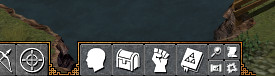 Some of these options are new to this version. The new default mode for loot tooltip visibility hides tooltips that would be obscured by the player and/or enemies. The mini-map display mode is an entirely new setting, allowing players to choose 1x zoom, 2x zoom, or hidden.
Please note that the options that previously existed in the “Interface” tab of the configuration menu are no longer there. Mods that aren’t based on fantasycore will need to be updated to present these options in game. Players that want to change these settings on a mod that hasn’t been updated will need to either load up a fantasycore-based game first or change them via Flare’s settings.txt configuration file (see the README for where this is located on your platform).
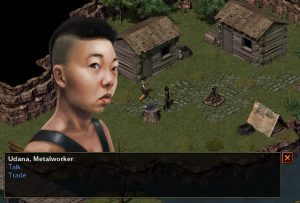 Another big change is to the way dialog choices are presented. Instead of being in a separate menu, dialog choices are now displayed inside the dialog window. The most notable change this brings is the ability to display dialog choices alongside the dialog itself for context. This makes it easier for NPCs to ask the player questions.
New options for mouse movement
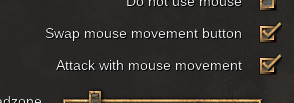 Two new options have been added to the “Input” section of the configuration menu for tweaking the way that mouse-only movement works. The first option allows swapping the movement button. Typically, this means using left mouse vs right mouse for movement. The second option controls if the player can attack enemies by clicking on them with the movement button. Based on feedback during development, these two options cover a good variety of preferences when it comes to the way mouse movement behaves.
Introduction of Alchemy
The Empyrean campaign had a balance issue when it came to potions. Highly leveled players could easily farm potions from low level enemies. Yet they would still be just as effective because they heal a percentage of the player’s HP/MP. Without changing how the potions themselves worked, the next way to balance this was to change how the potions can be obtained. Enter the Empyrean campaign’s new alchemy system.
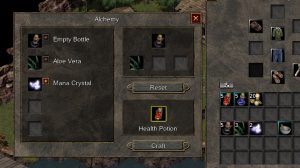 Florin in Perdition Harbor now offers an alchemy service, as well as selling a mortar and pestle for portable potion crafting. Crafting a potion requires an empty bottle, which can be purchased from all traders that sell normal potions. These empty bottles can be combined with one or more ingredients to create potions. These ingredients are Aloe Vera and Mana Crystals, which now drop from enemies instead of potions. Currently, the only potions available to craft are single ingredient ones. Use an empty bottle and Aloe Vera to create a Health Potion, or use an empty bottle and a Mana Crystal to create a Mana Potion. More ingredients and potion recipes will come in the future.
 Windows
 Linux
Changelog
Engine features
- Redesigned mouse movement with better handling of non-melee attacks.
- New mouse movement options to swap the movement button and/or restrict the movement button to be movement-only.
- Loot tooltips can now be hidden when entities are near pieces of loot. The setting “hide_radius” has been added to engine/loot.txt to control this.
- Overhead markers are now displayed for entities that are obscured by tall tiles.
- Dialog options are no longer shown in a separate menu, but are instead part of the main dialog window.
- Added support for dialog responses. For any line of dialog, a list of response topics can be given.
- Add ‘save_pos_onexit’ to engine/misc.txt for saving the player’s current position upon exiting.
- Added ‘colorblind_highlight_offset’ and listbox ‘text_margin’ to engine/widget_settings.txt.
- Added a compass to the minimap.
- Moved several interface options to the actionbar. Loot tooltips, combat text, statbar labels, and mini-map mode can be adjusted.
- Moved the interface option for automatically equipping items to the Inventory menu.
- Add ‘toggle_fps’ to the developer console commands.
- Added a 2x zoom mode for the mini-map.
- Add a video setting to disable parallax layers.
- Add ability to use icons in books.
- Add support for shadows on book text via ‘text_shadow’.
- Add item property ‘book_is_readable’ to control displaying ‘read’ vs ‘use’ in item tooltips.
Engine fixes
- Fixed shrinking tab widgets when widow was resized.
- Remove broken ‘font_fallback’ from engine/font_settings.txt.
- Add tooltips to language list to show language codes.
- Make strings related to elements more translator-friendly.
- Fixed a bug where looped map sounds wouldn’t play if the player entered the map with a sound volume of 0, but later raised the volume.
- Fix buttons and checkboxes not handling clicks while the “Accept” key is pressed.
- Fix incorrect descriptions of controls on mobile devices.
- Add renderer support for batching calls to local pixel drawing. This speeds up the pre-render of the minimap.
- Widgets that use custom images can now fall back to the default image if the custom image is missing (instead of exiting in failure).
- Using consumables from the Inventory menu will now subtract from the stack that was clicked on.
- Missing items now maintain their stack quantity when moved around.
- Fix potential memory leak when redefining images in books.
- Fix book open sound effect not being played in all cases.
- Closing a book with the ‘Cancel’ key no longer closes all other menus.
- Fix handling of disabled widgets when using keyboard navigation.
Game changes
- Fix the “Locked Out” quest not appearing in the completed quests list.
- Add interface option buttons to the actionbar.
- Add auto-equip checkbox to the Inventory menu.
- Added script font for Cyrillic languages.
- Made changes to the Wizard’s Tower: Laboratory map to prevent attacking Metzger from outside the intended range.
New translations
- Catalan (ca) by Marc Tormo i Bochaca
Translation updates
- German (de) update (Fyrenic)
- Scottish Gaelic (gd) update (GunChleoc)
- Brazilian Portuguese (pt_BR) update (Rui)
- Portuguese (pt) update (Rui)
- Ukranian (uk) update (Igor Paliychuk)
- Vietnamese (vi) update (Nguyễn Gia Phong)
 Another big change is to the way dialog choices are presented. Instead of being in a separate menu, dialog choices are now displayed inside the dialog window. The most notable change this brings is the ability to display dialog choices alongside the dialog itself for context. This makes it easier for NPCs to ask the player questions.
 Florin in Perdition Harbor now offers an alchemy service, as well as selling a mortar and pestle for portable potion crafting. Crafting a potion requires an empty bottle, which can be purchased from all traders that sell normal potions. These empty bottles can be combined with one or more ingredients to create potions. These ingredients are Aloe Vera and Mana Crystals, which now drop from enemies instead of potions. Currently, the only potions available to craft are single ingredient ones. Use an empty bottle and Aloe Vera to create a Health Potion, or use an empty bottle and a Mana Crystal to create a Mana Potion. More ingredients and potion recipes will come in the future.